Digital twins are virtual simulations mirroring physical objects in real-time, unlike static simulations. They comprise a physical object, a virtual model, and a continuous data link, enabling real-time analysis, prediction, and optimization.
This blog document highlights digital twin applications in robotics and mechatronics, modeling ACROME's Ball and Beam Experiment System using MATLAB® Simscape™, Simscape Electrical™, and Simscape Multibody™, demonstrating its use for educational and research purposes.
1. What is a Digital Twin ?
A digital twin is a virtual simulation of real world objects , processes or systems. This term mimics the properties , performance and behavior of a physical object , allowing for real time analysis , prediction and optimization. A revolutionary tool in engineering , the digital twin plays a key role in the design , development and operational efficiency of complex systems , especially in robotics and mechatronics projects.
A digital twin has three main components:
- The Physical Object : A real world asset , such as a robotic arm , an engine or an entire production line.
- The Virtual Model : A digital version that contains all the geometric , physical and dynamic properties of the physical object.
- The Data Link : The continuous transfer of data collected from the physical object via sensors (like temperature , pressure , vibration , position etc.) to the virtual model that keeps the model updated.
Thanks to this constant data flow , the digital twins can behave in real time , predict failures and be used to determine the best operational strategies. This makes the digital twins a formore powerful tool than a static simulation.

1.1. Key Differences Between a Digital Twin and a Simulation Model
While the terms digital twin and simulation are often used interchangeably , there is a very huge difference between them. Understanding this distinction is vital for correctly leveraging the potential of both technologies.
- Simulation : A simulation is typically the model with a defined beginning and end , used to predict how a scenario or system will behave. It works with static data to explore “What If” scenarios such as testing kinematic performance of a robot to set the design or analyzing the efficiency of a factory line . The purpose of a simulation is to validate a hypothesis or design a system in a virtual environment.
For example , Engineers are designing an assembly line for a new car model and want to optimize the robotic arm's task. They use simulation software to calculate how long it will take the robot to pick up a specific part and place it in position. They input static parameters like the robot's speed, mass, and motion paths. The simulation is run multiple times to find the most efficient route and to check for collisions with other robots or equipment. The goal here is to create an ideal task plan in a virtual environment before the physical robot is even built. Once the simulation completes its analysis, its task is finished, and it has no connection to the real-world robot.
- Digital Twin : This term is a living virtual model that continuously exchanges data with its physical counterpart in the real world. It updates itself by receiving real time data from sensors that are used in your project. You can say that a digital twin is the combination of a simulation and sensors.
Now, the same robotic arm is actively working in the factory. Data from the robot's motors, joints, and sensors (temperature, torque, vibration, position) is collected in real-time and sent to the robot's digital twin. The digital twin uses this data to precisely reflect the physical robot's current status. For instance, it might notice that a motor's temperature is rising above normal and use that data to predict that the motor will likely fail in a few weeks. The maintenance team can then use this insight to intervene before the robot breaks down, preventing unplanned production downtime. The digital twin "lives" with the robot throughout its lifespan and is constantly updated.
In short , a simulation is a one time scenario run to understand how a system might behave under specific conditions , while digital twin is a living model that continuously reflects the current state of the physical system.
1.2. Digital Twin Use Cases in the Robotics and Mechatronics
- Design and Optimization : Engineers can create a digital twin of a robot before producing a physical prototype. In this virtual environment , the robot’s kinematic and dynamic behaviours can be tested using physical modeling software like Simscape or platforms such as MATLAB/Simulink. Different sensor configurations can be tried , and potential design flaws can be identified at a very early stage. This move shortens the design and cycle and reduces project’s costs.
- Manufacturing and Assembly Simulation : Digital twins of all robotics arms and automation equipment in a manufacturing facility are created with industrial simulation software like Siemens Tecnomatix or Dassault Systèmes DELMIA. In this virtual factory environment , the production line layout , robot task assignments and cycle times can be optimized. Collision risks , idle times and bottlenecks can be addressed virtually , which significantly increases factory efficiency.
- Predictive Maintenance and Performance Management : Data from a robotic arm’s sensor is transferred to its digital twin via Industrial IoT platforms like PTC ThingWorx or GE Predix or Altair's Activate. The model analyzes this data to predict potential failures , such as an overheating motor or a worn out bearing.
You may watch below video to see the digital twin of our Acrobot in action:
- Training and Operator Support : Digital twins can be integrated with virtual reality(VR) environments created using game engines like Unity or Unreal Engine. This enables operators to safely train on the use and maintenance of robotic systems in a virtual setting. Complex assembly or maintenance procedures can be practiced repeatedly on the virtual model without the risk of damaging the real equipment.
1.3. Pros and Cons of Digital Twins
Pros:
- Cost and Time Savings: Reduces the need for physical prototypes, accelerating the design, testing, and validation processes and lowering costs.
- Risk Mitigation: Dangerous or costly scenarios can be tested in a virtual environment. This enhances human safety and prevents equipment damage.
- Improved Efficiency: Enables the optimization of processes with real-time data, increasing operational efficiency.
- Enhanced Product Quality: Improves product quality by detecting design flaws early and continuously monitoring performance.
Cons:
- High Initial Investment: Requires advanced software, sensors, and data infrastructure, which can result in a high initial investment.
- Data Security and Privacy: The collection, transfer, and storage of sensitive data from physical assets pose significant security risks.
- Model Complexity: Creating a highly accurate digital twin requires advanced engineering knowledge and precise modeling skills. If the model is not accurate enough, it can lead to incorrect results.
2. Digital Twin of Ball and Beam in Matlab® Simscape™
This section focuses on the simulation of the Ball and Beam (BB) system using Simscape™ within the MATLAB® Simulink™ Quickstart environment. The simulation system uses a PID algorithm to control the position of the ball through feedback, ensuring that the ball remains balanced at the center of the platform, while interacting with the electrical motor and gathering the ball position data from the digital twin environment.
2.1. QuickStart Example
The ACROME Ball and Beam system offers an engaging and practical way for students to explore the fundamentals of control systems and mechatronics. By interacting with a real physical setup, learners can move beyond theory and actually see how concepts like feedback, stability, and tuning affect system behaviour. Whether experimenting with PID controllers or testing custom algorithms, the system helps bridge the gap between classroom learning and real-world engineering applications.
Additionally, the system is suitable for testing advanced control techniques such as robust and adaptive control, making it applicable for graduate-level research as well. Thanks to its open-source software support, users can develop their own algorithms and integrate them directly into the system.
This section will explain the Quick Start process of the BB (Ball and Beam) system using MATLAB Simulink and the Simscape extension.
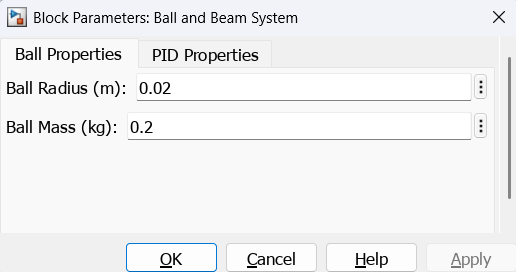
- Ball Properties
The radius (m) and mass (kg) of the ball are entered by the user.
- Trajectory Modes
- Position Mode:
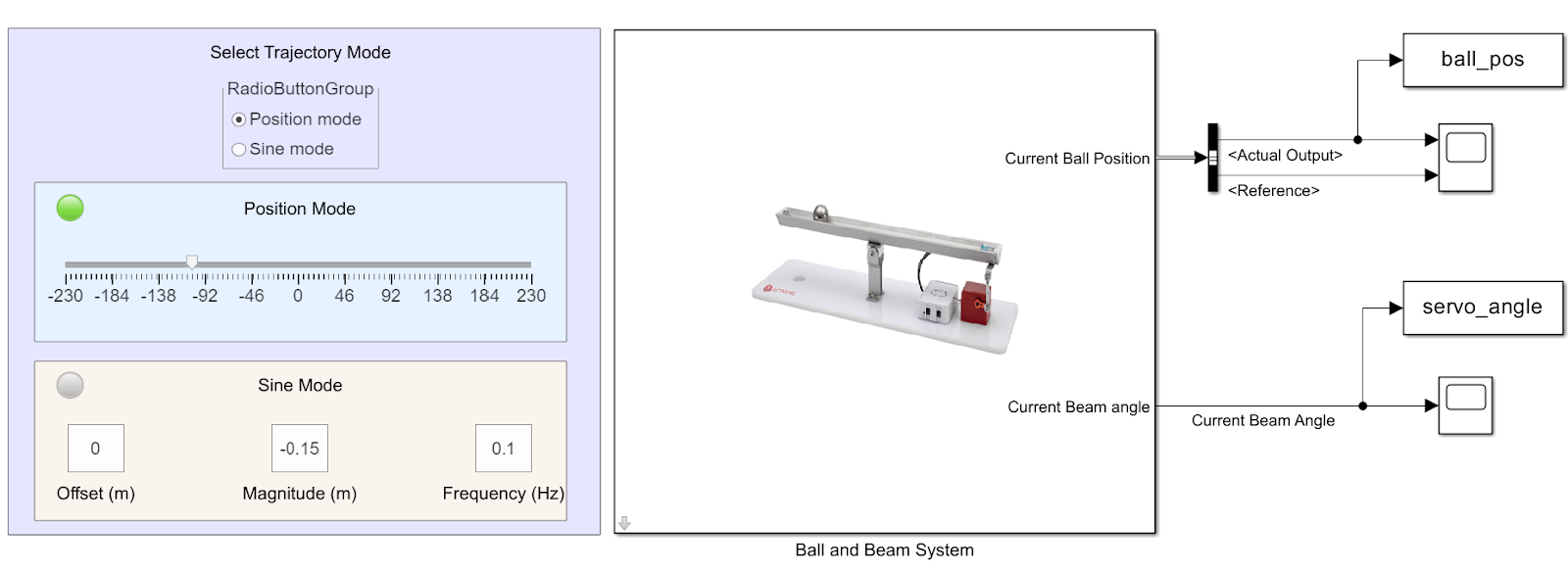
The ball moves towards a fixed position at a certain point. The reference value is set with the slider.
- Sine Trajectory:
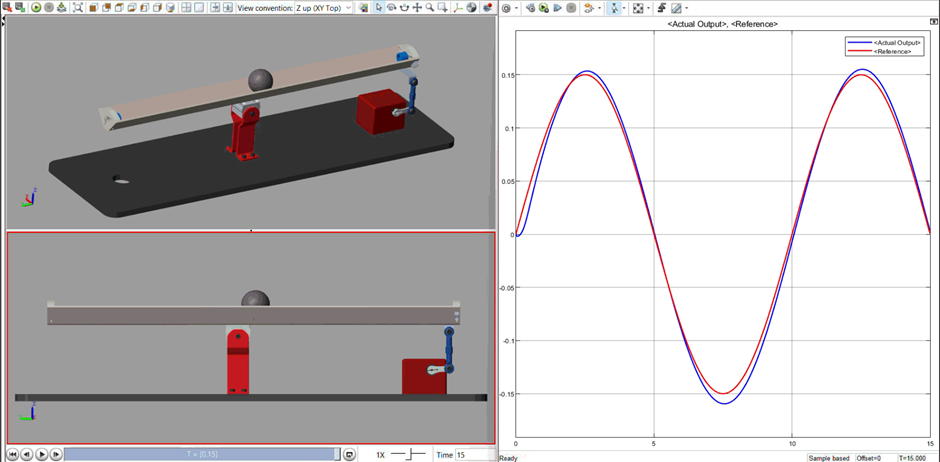
The ball moves back and forth in a sinusoidal pattern. The frequency, magnitude, and, if necessary, the offset values can be set from this menu.
The desired mode is selected by the user.
- PID Parameters Tuning
A closed-loop system is used to compare the reference value with the measured value. The resulting error is detected using a linear potentiometer sensor and sent to the controller. The controller processes the error and generates a control signal, which is then sent to the actuator of the BB.

2.2. Simscape Simulation Requirements for Ball and Beam System
The Ball and Beam system can be modeled using the Simscape environment. In this system, a PID controller adjusts the beam angle in response to changes in the ball’s position, aiming to keep the ball balanced at the center. Simscape allows us to simulate physical systems with realistic mechanical constraints and force-torque relationships. Simscape enables accurate modeling of physical behaviors such as gravity, friction, and mass properties, making the simulation highly realistic.
If you are not sure about Simscape is installed or not , you can check by using that command :
ver('simscape') . If it is not installed you can follow the figures below to start installation.

Furthermore, the electrical actuation of the beam in the Ball and Beam system can be modeled using Simscape Electrical. This library enables physical modeling of motors, sensors, power sources, and control circuits. Simscape Electrical is especially useful in analyzing realistic motor behavior, including current draw, voltage levels, power consumption, and system responses under stress conditions like overheating or torque limits.
To model the physical behavior of the Ball and Beam system more realistically, the Simscape Multibody library is used. This library allows modeling of 3D mechanical components such as solids, joints, sensors, and actuators. Simscape Multibody is especially useful for analyzing mechanical systems with moving parts and complex linkages. This makes it highly applicable for both educational and research purposes in the Ball and Beam setup.
Finally, the Simscape Multibody Contact Forces Library that provides ready-to-use blocks for modeling contact forces between bodies in multibody simulations. Following figures can help you to install that add on.

2.3. Simscape Model Simulation Responses of the Ball and Beam
To begin, one must select the "Trajectory Mode" using the "RadioButtonGroup" as depicted in the accompanying Figure.
Furthermore, it is necessary to configure the "Ball Properties" and "PID Properties" by double-clicking the "Ball and Beam System" block within the Simulink Model. The Ball Radius and Ball Mass can be adjusted according to preference, and these modifications will influence the simulation response.
Ball's motion can be observed from the Simscape ainmiation screen, while simulation and measurement data can be analysed using standard tools such as Charts available in Simulink.

3. Conclusion
The digital twin concept, as demonstrated with the Acrome Ball and Beam system in MATLAB Simscape, offers a powerful approach to engineering education adnd reserach as well. This document has highlighted how digital twins differ significantly from traditional simulations by providing a continuous, real-time reflection of a physical system. By integrating data from sensors, the digital twin enables advanced functionalities such as predictive maintenance, optimization of operational strategies, and comprehensive analysis of system behavior that static simulations cannot achieve.
The application of Simscape, Simscape Electrical, and Simscape Multibody further enhances the realism and accuracy of the digital twin for the Ball and Beam system. These tools allow for detailed modeling of mechanical, electrical, and contact forces, providing a robust platform for testing and validating control algorithms, such as the PID controller used to maintain ball position.
Ultimately, digital twins, particularly in robotics and mechatronics, provide an invaluable tool for reducing costs, mitigating risks, improving efficiency, and enhancing product quality throughout the entire lifecycle of a system. Their ability to bridge the gap between the virtual and physical worlds makes them an indispensable asset for both educational and industrial applications.
Author